Build and ship websites your whole team can edit
A modern web framework paired with a headless CMS. Developers build with components; editors compose pages with them.
- 1Create a pagePick a template or start blank
- 2Add modulesHero, features, pricing, FAQ…
- 3PreviewShare a draft link with your team
- 4PublishLive in seconds, no deploy needed
Trusted by content teams at fast-moving companies



Built for teams that publish every day
-
Learn more
Visual page building
Editors compose pages from your components, with live previews as they type.
-
Learn more
Shareable previews
Send a draft link to anyone. No account, no staging server.
-
Learn more
Localization built in
Translate every field, manage locales and ship regional variants from one document.
-
Learn more
Scheduled releases
Bundle changes across pages and publish them together at a set time.
-
Learn more
Roles and permissions
Give each team exactly the access it needs, down to the collection.
-
Learn more
Version history
Every save is a version. Compare changes and restore in one click.
Editing
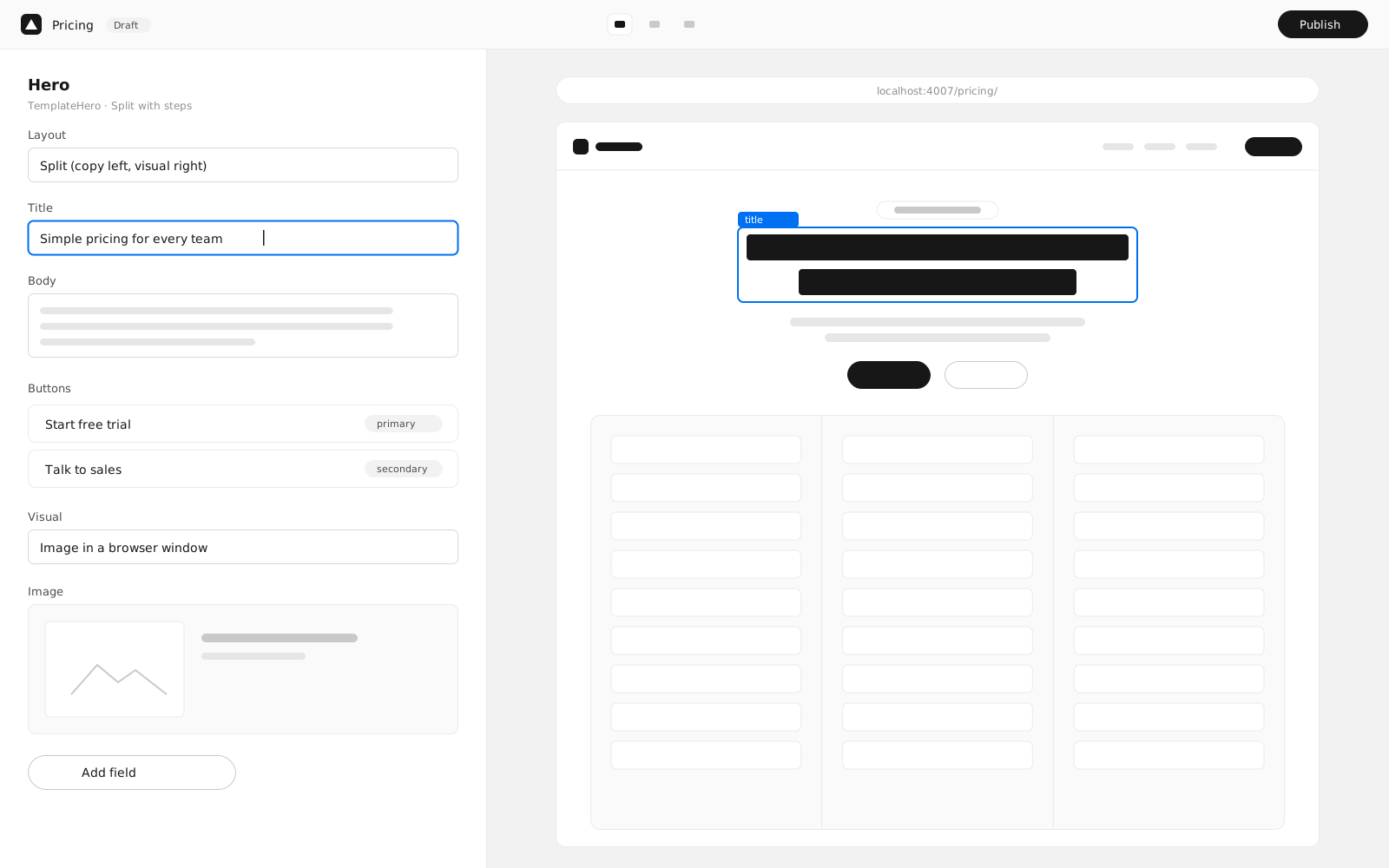
Edit the page, not a form
Root.js puts a live preview next to every field, so editors see exactly what will ship before they publish.
-
Live preview. Changes render instantly in a side-by-side preview of the real page.
-
Modules, not markup. Add, reorder and configure sections from your design system.
-
AI assist. Draft headlines, tighten copy and fill alt text in one click.
-
Version history. Compare any two saves and restore with confidence.
By the numbers
Teams publish more, and wait less
- Faster publishing
- 4×
- Median time from draft to live, compared with a legacy CMS.
- Time to first byte
- <50ms
- Static pages served from the edge.
- Locales shipped
- 42
- From a single source of truth.
- Uptime
- 99.99%
- Over the last twelve months.
Use cases
One platform, every kind of page
From a single landing page to a global site in forty languages, Root scales with your content.
Marketing sites
Give marketers a library of on-brand modules and let them launch campaigns without a ticket.
See templatesexport default schema.collection({ name: 'Pages', url: '/[...slug]', preview: {title: 'meta.title'}, fields: [ // Editors stack modules from the design system. schema.array({ id: 'modules', of: schema.oneOf({types: schema.glob('/templates/*/*.schema.ts')}), }), ],});Global launches
Translate every field, preview each locale and publish all markets together with a scheduled release.
Learn about localizationexport default defineConfig({ i18n: { locales: ['en', 'de', 'fr', 'ja', 'es-419'], // /de/pricing/, /ja/pricing/, … urlFormat: '/{locale}/{path}', },});Content-driven apps
Fetch published content from any route or API. Render statically, or on request with SSR.
Read the docsexport async function getStaticProps(ctx) { const cms = new RootCMSClient(ctx.rootConfig); // Published docs only; drafts show in preview. const post = await cms.getDoc('BlogPosts', ctx.params.slug, {mode: 'published'}); return {props: {post}};}
We moved 14 regional sites onto one codebase in a quarter. Launches that took two sprints now take an afternoon.
 Priya RamanDirector of Web, Acme
Our marketing team ships pages without filing a ticket. Engineering finally gets to work on the product.
 Marcus ChenHead of Engineering, Globex
Blog
Latest from the team
Product updates, engineering deep dives and stories from teams shipping with Root.js.

Introducing module presets
Start every section from a designed, on-brand variant. Presets turn a blank module into a finished one in a single click.

How we ship a site in five languages without slowing down
Field-level translations, locale fallbacks and a review workflow that fits how content teams actually work.


Designing a quiet interface
Why our design system is monochrome, and how tokens let every section switch between light and dark.
Frequently asked questions
Can’t find what you’re looking for? Our team is happy to help.
01Where are sites hosted?
Sites run on a global edge network with automatic TLS. Pages are server-rendered and cached close to your visitors, so they load fast everywhere.
02How does localization work?
Mark any field as translatable and Root.js tracks every string. Export to your translation vendor, import the results, and publish all locales at once.
03Can I control who edits what?
Yes. Assign Viewer, Editor, Contributor or Admin roles per project, and require approvals before changes go live.
04How do we migrate an existing site?
Most teams start by rebuilding their templates as modules, then import content with our migration scripts. Our team can help plan the cutover.
05How is pricing calculated?
You pay per editor seat. Viewers are free, and there are no per-page or bandwidth fees on any plan.
06Does Root.js use AI?
Optional AI tools help draft copy, suggest alt text and pre-translate content. Nothing is published without a human review, and you can turn them off per project.
Get started
Create a project, connect the CMS and deploy. It takes about five minutes.
-
Create a new Root.js project from the starter.
$npm create root-app@latest -
Start the dev server with the CMS attached.
$npm run dev -
Deploy to production when you are ready.
$npm run deploy